
[:en]
Choisir l’outil
Choisir l’outil
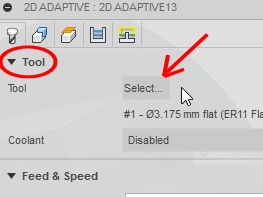
The tool select need doing in beginning of machining start.
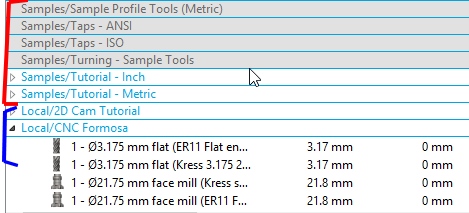
The tools in sample library (red color) can be use but not revised.
The tools of local library (blue) can be change, update.
Update the library tools
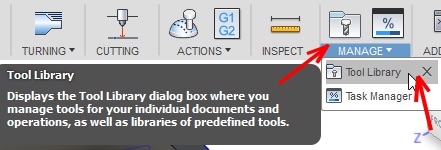
Need go to « Manage » and after « Tool Library »
1 ) Copy a sample tool and after paste it inside local library to have possibility to change.
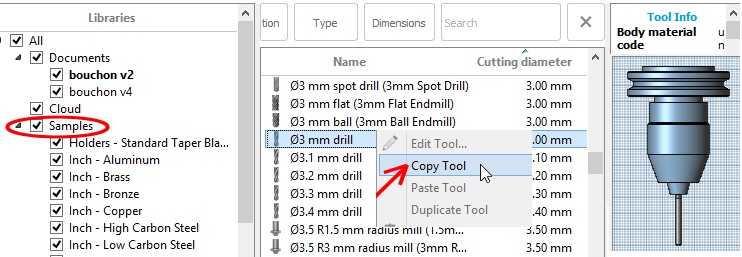
Copy a tool inside « Sample » library
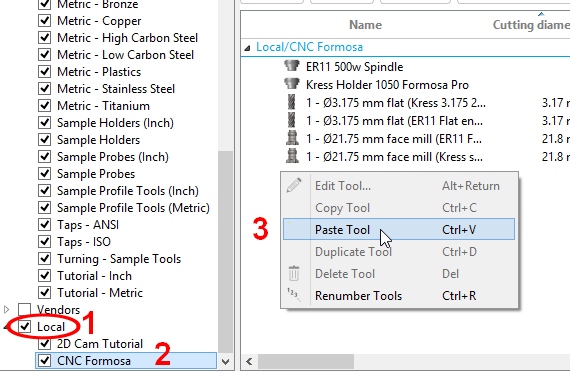
After paste it inside local library
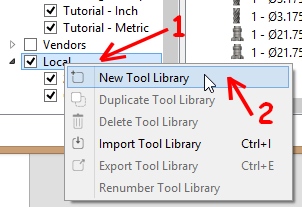
2 ) Import a tools library
Need first create local library
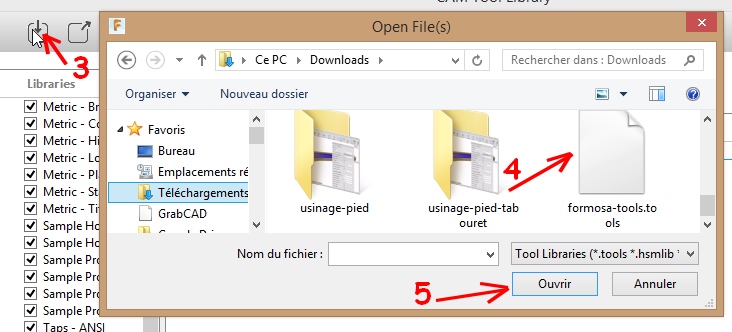
It possible after import the tools inside local library with import file
Choisir l’outil
La sélection de l’outil se fait en début de paramétrage d’usinage.
Les outils dans les bibliothèques « Samples » ( exemple, spécimen ) peuvent être sélectionnés et utilisés mais pas modifiés.
Les outils dans les bibliothèques locales peuvent être sélectionnés et modifiés.
A ) Modification de la bibliothèque d’outil
Il faut aller dans « Manage » puis « Tool Library »
1 ) Copier un outil exemple et le mettre dans une bibliothèque locale pour le modifier.
Copiez un outil dans une bibliothèque « Sample »
Puis à l’intérieur d’une bibliothèque locale coller l’outil « Paste tool »
2 ) Importez une bibliothèque d’outil
Il faut créer d’abord une bibliothèque d’outil locale.
Il est possible ensuite d’importer les outils dans cette bibliothèque grâce au fichier d’importation.
0 commentaires